VMware, in simple terms, is a family of technologies used for virtualization and enterprise infrastructure operations. In practice, when people say "VMware," they usually mean vSphere, ESXi, vCenter Server, availability services, resource balancing, and private cloud operations together. This guide answers three common questions in one place: "What is VMware?", "What is virtualization?", and "What does VMware actually do?"
Quick Summary
- Broadcom's ESXi Installation and Setup documentation frames VMware ESXi around host-level installation and configuration workflows.
- Broadcom's monitoring guide brings together Performance Charts, Events and Alarms, Host Health, and
resxtop/esxtoputilities in one operational model. - In Broadcom TechDocs, the current ESXi 8 line still shows ESXi 8.0 Update 3i with date February 24, 2026 and build 25205845.
- Broadcom KB 313156 states that ESXi 8.0 needs at least 32 GB of persistent boot storage and that the boot device must not be shared across hosts.
- The vSphere Security documentation highlights UEFI Secure Boot, TPM, Lockdown Mode, vSphere Trust Authority, vTPM, and TLS configuration together.
- Broadcom's March 4, 2025 advisory VMSA-2025-0004 reported critical VMware ESXi issues in the 7.1-9.3 CVSS range and noted "in the wild" exploitation for some CVEs.
Table of Contents
- What Is VMware?
- What Is Virtualization and How Does VMware Apply It?
- Core VMware Components
- What Does VMware Do in Enterprise Environments?
- 2026 Technical and Operational Notes
- Why Security and Monitoring Cannot Be Separated
- Frequently Asked Questions
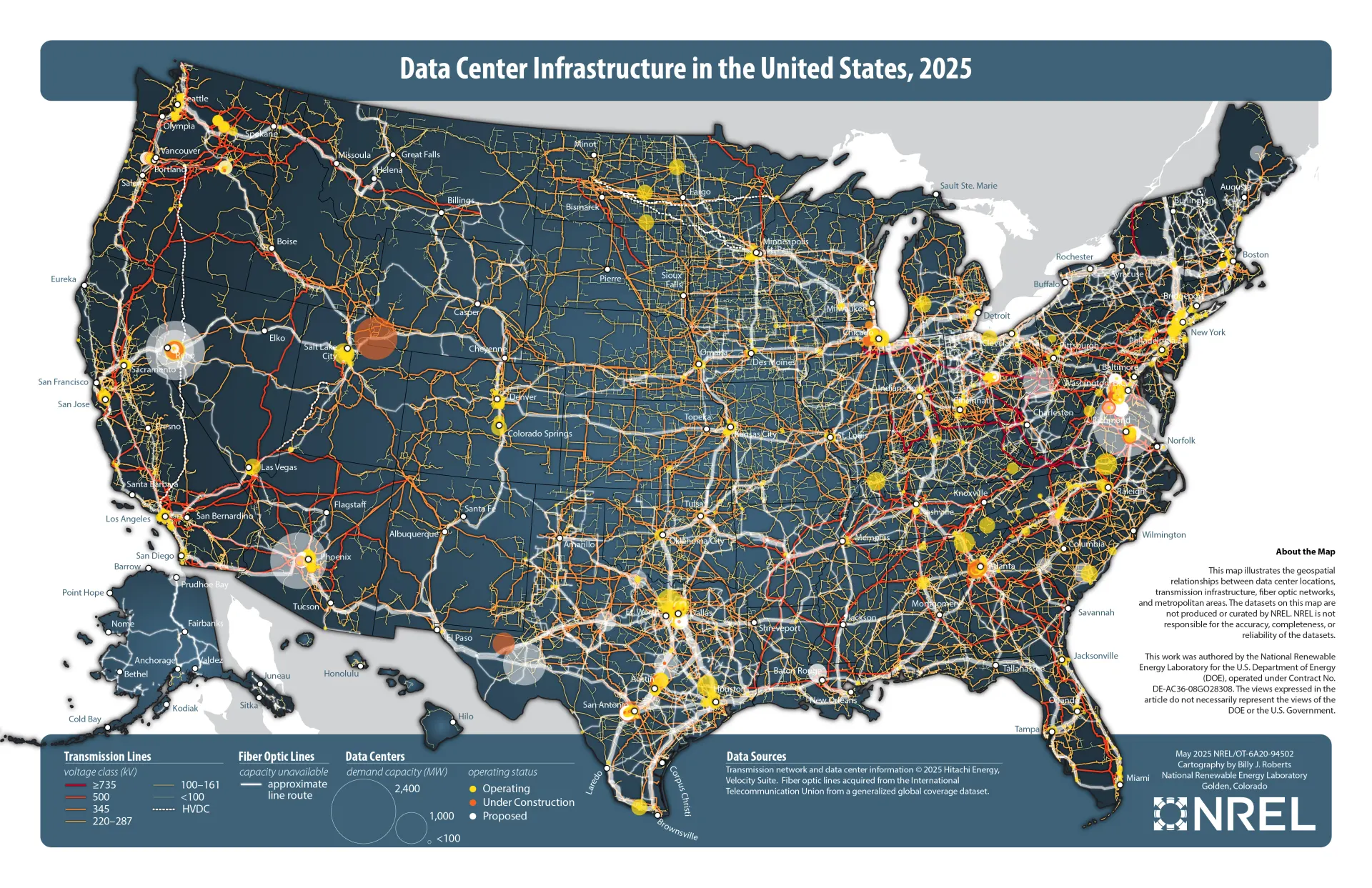
Image: Wikimedia Commons - Data center infrastructure in the United States (CC0).
What Is VMware?
VMware is one of the technologies most closely associated with enterprise virtualization. Technically, VMware is not a single product. It is a broader platform model that includes the host layer that runs virtual machines, centralized management components, security and monitoring tooling, cluster services, and operational building blocks for private cloud environments.
When an organization says "we are deploying VMware," they usually mean one or more of the following:
- Running virtual machines on physical servers
- Building a vSphere and ESXi-based virtualization environment
- Managing infrastructure centrally with vCenter
- Establishing enterprise operating standards through HA, DRS, and lifecycle tooling
So the most accurate answer to "What is VMware?" is this: VMware is the ecosystem that turns virtualization into an enterprise operating model.
What Is Virtualization and How Does VMware Apply It?
Virtualization is the abstraction of physical hardware resources through software so multiple workloads can share them. VMware applies that model by combining the hypervisor layer, the virtual machine layer, and centralized management into something that can be operated at enterprise scale.
VMware applies that model through a simple chain:
- The hypervisor layer manages physical CPU, memory, storage, and networking.
- The virtual machine layer presents virtual hardware to each workload.
- The management layer coordinates multiple hosts, policies, alarms, security, and updates.
The result is that a physical server stops being a single-purpose machine and becomes a platform for multiple workloads, better utilization, and more flexible operations.
Core VMware Components
To understand VMware in enterprise architecture, you need to separate the main building blocks:
| Component | Role | Why It Matters |
|---|---|---|
| VMware ESXi | Host hypervisor | Runs virtual machines on physical hardware |
| VMware vCenter Server | Central management layer | Manages multiple hosts, permissions, alarms, and lifecycle |
| VMware vSphere | Platform umbrella | Brings ESXi, vCenter, and related services into one operating model |
| HA / DRS | Availability and resource balancing | Improves continuity and workload placement |
| Security / Monitoring | Protection and visibility | Required for secure and manageable operations |
That leads to one important distinction:
- ESXi runs the workloads
- vCenter manages the environment
- vSphere is the broader platform
What Does VMware Do in Enterprise Environments?
The value of VMware is not limited to "running more than one VM on a server." Its real value is operational.
1. It Consolidates Infrastructure
Instead of keeping underused physical servers for individual applications, VMware lets teams pool workloads on shared infrastructure. That usually improves hardware utilization and reduces related rack, power, and maintenance overhead.
2. It Improves Isolation and Flexibility
Applications do not need to be pinned to separate physical servers. Test, development, production, and business-critical services can be separated at the VM level while still using the same physical resource pool.
3. It Establishes Operational Standards
Once HA, DRS, snapshots, replication, backup, and lifecycle tooling are introduced, the environment becomes something that is actively operated, not just installed.
4. It Makes Growth More Manageable
As the environment expands, adding hosts, datastores, clusters, and security policies becomes far more consistent than scaling isolated physical servers one by one.
That is also why many organizations in Ankara do not need "just virtualization." They need a maintainable and governable operating model.
2026 Technical and Operational Notes
As of March 12, 2026, Broadcom sources show ESXi 8.0 Update 3i with build 25205845 in the ESXi 8 release line. The related release note lists:
- Release date: February 24, 2026
- ISO file:
VMware-VMvisor-Installer-8.0U3i-25205845.x86_64.iso - ISO size: 630 MB
- Offline bundle size: 979 MB
- Host reboot required: Yes
- Virtual machine migration or shutdown required: Yes
These details matter because a VMware environment is not a one-time installation. Update cadence, host standardization, and compatibility management are part of the architecture.
Broadcom KB 313156 adds another important requirement:
- ESXi 8.0 needs at least 32 GB of persistent boot storage
- The boot device must not be shared across ESXi hosts
- Non-USB boot devices smaller than 8 GB can create issues for future major upgrades
That is why "What is VMware?" cannot be answered only at the concept level. VMware also means operational discipline around versions, compatibility, and change control.
Why Security and Monitoring Cannot Be Separated
Broadcom's vSphere Security documentation highlights:
- UEFI Secure Boot
- Trusted Platform Module (TPM)
- Lockdown Mode
- vSphere Trust Authority
- Virtual Trusted Platform Module (vTPM)
- Managing TLS Protocol Configuration
Broadcom's vSphere Monitoring and Performance documentation highlights:
- Performance Charts
- Events, Alerts, and Alarms
- Host Health
- System Log Files
- resxtop / esxtop
Taken together, the conclusion is straightforward:
- A VMware environment that is not secured is not sustainable.
- A VMware environment that is not observable is not manageable.
One of the clearest field examples is Broadcom advisory VMSA-2025-0004. It was published on March 4, 2025, reported critical issues in the 7.1-9.3 CVSS range, and noted "in the wild" exploitation for some CVEs. That is why patch management is not theoretical. It is part of business continuity.
Quick Start Checklist
- Confirm whether the goal is basic VM consolidation or a full enterprise operating model
- Document ESXi host design, storage, and networking in one architecture flow
- Standardize boot media at 32 GB persistent storage minimum
- Reassess the need for vCenter beyond a single-host mindset
- Define Secure Boot, TPM, and administrative access controls
- Plan alarms, logs, and performance monitoring from day one
Next Step with Leon-X
The healthiest approach to VMware planning is to define workloads and growth goals first, then model ESXi, vCenter, networking, storage, and security decisions in a single architecture flow. That is how teams optimize operations rather than just deployment speed.
Related pages:
- Hardware & Software Sales
- Managed Services
- Contact
- VMware ESXi: What It Is and How It Works
- What Is VMware vCenter and What Does It Do?
Frequently Asked Questions
Is VMware the same thing as vSphere?
No. VMware refers to the broader technology and product family. vSphere is the virtualization platform layer within that family. ESXi and vCenter are commonly discussed under the vSphere umbrella.
Is VMware only suitable for large enterprises?
No. Smaller and mid-sized organizations can also use it for consolidation, backup, testing environments, and operational consistency. The architecture just needs to match the scale and budget.
Do you always need vCenter to use VMware?
Not in every single-host case. But once you need multiple hosts, centralized identity, HA, DRS, and lifecycle workflows, vCenter becomes the normal requirement.
Why should VMware still be treated as a security topic on its own?
Because the hypervisor layer carries critical workloads directly. Broadcom advisories and TechDocs content make it clear that host hardening and patch discipline are built-in parts of operating the platform responsibly.
Conclusion
VMware is not just a single product that runs virtual machines. It is an ecosystem that turns enterprise virtualization into an operating standard. To understand VMware correctly, you need to look beyond the VM concept and include the ESXi host layer, vCenter management, the broader vSphere platform, security controls, monitoring capability, and continuous update discipline. As of March 12, 2026, official sources still point to the same conclusion: successful VMware environments depend as much on operating model quality as on technology choice.
If you need a VMware architecture, migration path, or infrastructure planning model tailored to your organization, you can contact Leon-X.
Sources
- Broadcom TechDocs - ESXi Installation and Setup
- Broadcom TechDocs - vSphere Security
- Broadcom TechDocs - vSphere Monitoring and Performance
- Broadcom TechDocs - VMware ESXi 8.0 Update 3i Release Notes
- Broadcom KB 316595 - Build numbers and versions of VMware ESXi/ESX
- Broadcom KB 313156 - Guidance on minimum boot device size requirements
- Broadcom Security Advisory VMSA-2025-0004
- Wikimedia Commons - Data center infrastructure in the United States