The most common mistake in a Dell Server High Availability Design Guide is treating HA as nothing more than placing two servers side by side or adding dual power supplies. A resilient design is built only when power, cooling, hot-swap components, storage-path redundancy, cluster behavior, and observability are planned together. In short: real high availability in Dell server environments comes from combining component-level redundancy with failover-aware architecture and operational visibility.
This guide is especially useful for:
- infrastructure teams investing in PowerEdge platforms
- data center managers trying to reduce outage risk
- system engineers designing cluster and failover behavior
- organizations building highly available server infrastructure
Quick Summary
- Dell’s high-availability cluster documentation makes it clear that redundancy must extend beyond the server and into storage paths and controller layers.
- Dell’s rail and rack compatibility guidance shows that service access and cable-management behavior are part of availability design, not just installation detail.
- Dell PowerEdge owner manuals show that redundant PSUs and hot-swappable disks and fans must be evaluated as part of model selection, not only as technical specifications.
- OpenManage Enterprise Power Manager provides visibility into power supply state and thermal alerts, which turns an HA design into a measurable operating model.
- High availability is never about one redundant part; power, networking, storage, and management have to be considered together.
Table of Contents
- What Does High Availability Mean in a Dell Server Design?
- Which Physical-Layer Redundancy Decisions Matter?
- How Should Cluster and Storage Design Be Structured?
- Why Are Monitoring and Operations Part of the Design?
- Checklist
- Frequently Asked Questions
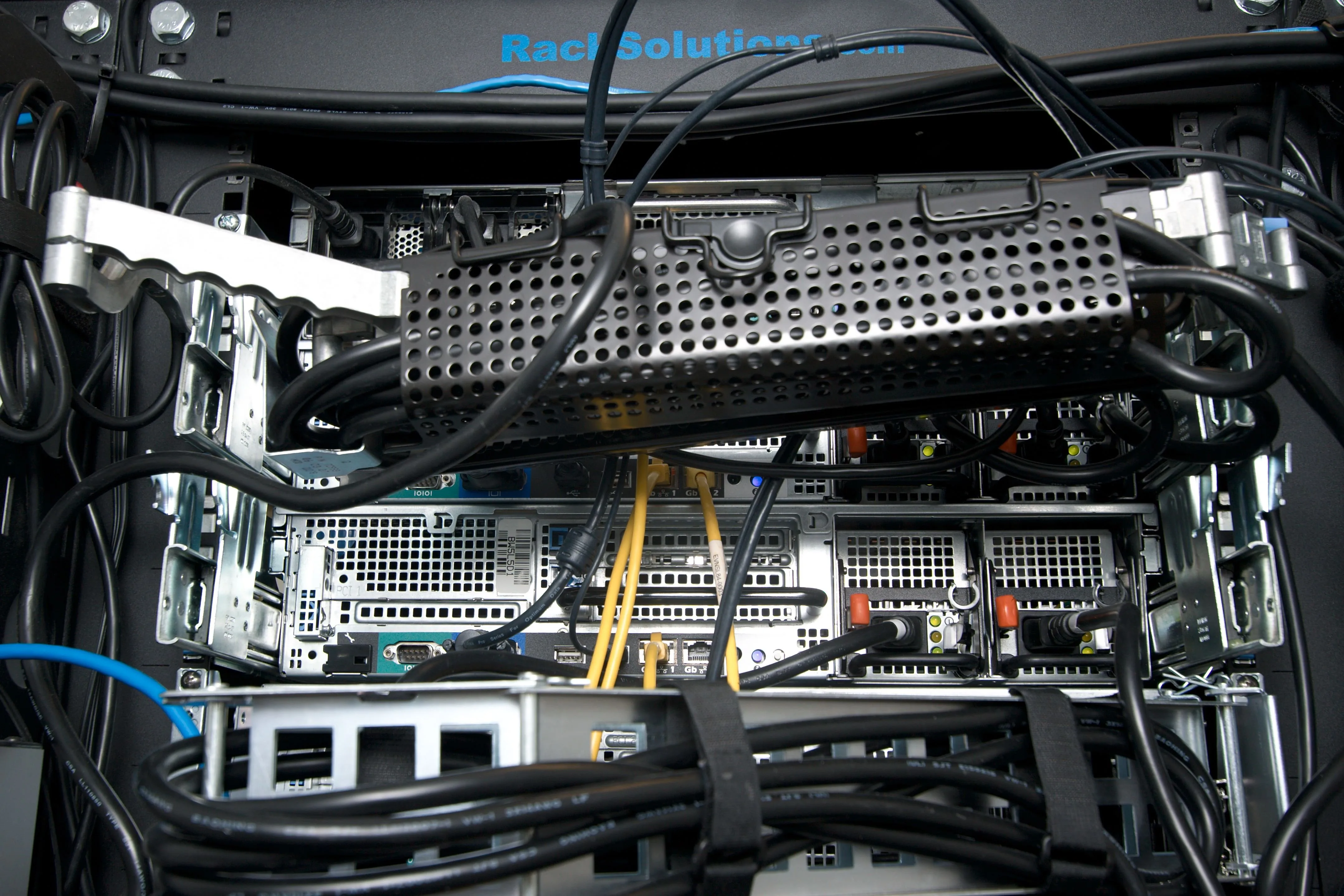
Image: Wikimedia Commons - Server Cable Management Arm (2).
What Does High Availability Mean in a Dell Server Design?
High availability is not just “the service stays up when a server fails.” Dell’s cluster guidance is more precise: data access should survive both planned and unplanned disruption, which means the server-to-storage path must be treated as part of the availability model.
That makes HA a design question across these layers:
- server component redundancy
- power feeds and PDU distribution
- storage controller and path redundancy
- cluster failover behavior
- service access during maintenance
- alerting and metrics visibility
That is why “dual PSUs means we are highly available” is not enough. The network, storage, and management layers also need fault tolerance.
Which Physical-Layer Redundancy Decisions Matter?
1. Redundant PSUs are necessary but not sufficient
Dell PowerEdge manuals such as the R630 documentation clearly show support for dual redundant AC or DC power supplies. But the value is only real if:
- the PSUs are connected to separate feeds
- they terminate on separate PDUs
- cabling layout avoids a single maintenance-induced outage
2. Hot-swappable components reduce service impact
Dell owner manuals and spec sheets present hot-swappable disks, fans, and PSUs not just as features, but as part of a serviceability model. Hot-swap matters because it:
- reduces planned outage windows
- shortens repair duration
- limits the operational blast radius of a component failure
3. Rails and cable management also affect availability
This is where many designs fall short. Dell’s rail sizing and rack compatibility matrix indirectly shows that physical fit and service clearance affect recoverability. If a server cannot be safely extended, maintained, or recabled under pressure, the recovery window gets longer.
How Should Cluster and Storage Design Be Structured?
Dell’s Building Highly Available Systems guidance highlights two essential lessons:
- host clustering alone is not enough
- redundancy must include the server-to-storage I/O path
Entry-level vs. fully redundant design
Dell’s reference material distinguishes between:
- entry-level single-path designs
- more resilient dual-port HBA designs
- fully redundant multi-HBA dual-path architectures
That distinction matters because:
- a single HBA can still become the failure domain
- a single controller or cable can still interrupt access
- transparent path failover is critical to application continuity
Questions the design should answer
- how many nodes are required
- how quorum or witness will behave
- how many paths each node has to storage
- how controller and cache resilience are protected
- what remains online during maintenance
In other words, compute redundancy without storage-path resilience is only partial availability.
Related Content
- Dell Server Datacenter Design Guide
- Dell Server Firmware Update Failed Issue
- Dell PowerEdge Audit Log for ISO 27001 Compliance
Why Are Monitoring and Operations Part of the Design?
High availability becomes mature not only when failover works, but when failure risk can be seen early. Dell OpenManage Enterprise Power Manager exposes signals such as power supply state and thermal alert state. That matters because it helps teams detect:
- power imbalance before a visible outage
- increasing thermal stress
- degraded components before service impact
A serious HA model should include:
- power consumption trends
- thermal alerts
- degraded hardware state
- post-maintenance validation
An architecture becomes truly operational when it is redundant and observable.
Checklist
- Dual PSUs are split across separate PDUs and feeds
- Hot-swap disk, fan, and PSU capability was validated during model selection
- Rail/CMA compatibility and service-clearance space were checked
- Cluster node count and failover logic were defined
- Storage path redundancy level was documented
- Single-failure scenarios for HBA, controller, and cable were tested
- OpenManage or equivalent observability layer was enabled
- Maintenance procedures preserve service continuity
Next Step with Leon-X
Dell server high availability design is not about collecting a list of resilient-looking parts. It is about designing how the service behaves during failure, maintenance, and growth. Leon-X helps organizations align PowerEdge hardware selection, redundant power, storage-path strategy, and operational monitoring into one measurable HA standard.
Relevant pages:
- Hardware & Software Services
- High Availability Server Infrastructure Solutions
- Server Installation, Configuration and Commissioning
- Contact
Frequently Asked Questions
Are dual PSUs enough for high availability?
No. If both PSUs terminate on the same power path or PDU, the design still contains a single point of failure.
Why do hot-swappable fans and drives matter so much?
Because they reduce the need for full shutdown during repair and shorten the interruption window.
If a cluster exists, is storage path redundancy still necessary?
Yes. A cluster may preserve compute availability, but storage access can still fail if the path is not redundant.
Why is cable management discussed in HA design?
Because serviceability affects outage duration. A design that is hard to maintain under pressure is not a strong availability design.
Can a design be considered HA if it is not monitored?
Only partially. It may be redundant on paper, but not predictable or operationally mature.
Sources
- Dell Enterprise Systems Rail Sizing and Rack Compatibility Matrix
- Building Highly Available Systems: Dell PowerEdge Cluster SE600W and PowerVault MD3000
- Dell PowerEdge R630 Owner's Manual
- Dell PowerEdge R420 Owner's Manual - Installing a Redundant Power Supply
- OpenManage Enterprise Power Manager - View Metrics and Monitor Devices and Groups History
- Wikimedia Commons - Server Cable Management Arm (2)