The short answer for FortiGate VLAN setup: create a VLAN subinterface on the right physical or aggregate interface, assign the vlanid and IP plan, write inter-VLAN policies, and verify 802.1Q trunk alignment on the uplink. Most production failures are not caused by the VLAN object itself — they come from broken trunks, missing routes, reversed policy direction, or mixing FortiLink-managed VLAN behavior with classic FortiGate interfaces.
This guide is especially for:
- network and security teams
- FortiGate administrators
- system teams designing branch, campus, or server-room segmentation
- operations teams using FortiSwitch and FortiLink
Quick Summary
- FortiOS defines a VLAN as an IEEE 802.1Q-based virtual interface bound to a physical interface.
- FortiGate handles VLANs differently depending on whether the device operates in NAT mode or transparent mode.
- Fortinet’s official examples show that multiple internal VLANs can share one uplink while still having separate policy streams.
- In FortiLink environments, VLAN role assignment, naming, and switch membership design must be planned in addition to FortiGate interface creation.
- A working VLAN interface does not guarantee working traffic. Routing and policy validation still matter.
Table of Contents
- What Does FortiGate VLAN Configuration Actually Mean?
- Which Design Decisions Should Be Made First?
- How Do You Create a VLAN Subinterface on FortiGate?
- How Should Inter-VLAN Routing and Policies Be Designed?
- What Should You Watch for with FortiLink and FortiSwitch?
- What Are the Most Common Mistakes?
- Related Articles
- Checklist
- Next Step with Leon-X
- Frequently Asked Questions
- Sources
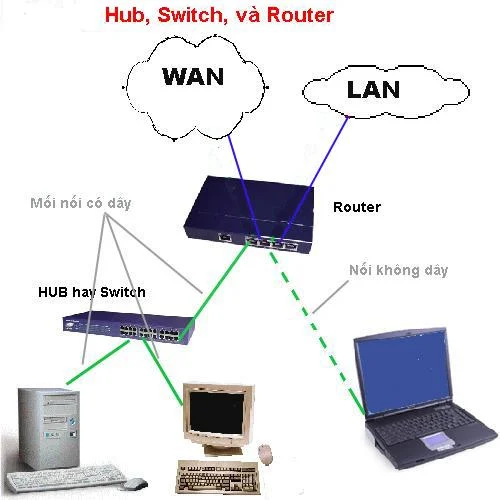
Image: Wikimedia Commons - Hub Switch Router.
What Does FortiGate VLAN Configuration Actually Mean?
FortiGate VLAN configuration means carrying multiple logical network segments over the same physical uplink and managing each segment as its own interface. In FortiOS, this is done with VLAN subinterfaces. Each subinterface:
- uses a parent interface
- carries a specific VLAN ID
- can have its own IP address and firewall policy context
- can be included in DHCP, zones, or other higher-level network designs
Because of that, VLAN design is not only an L2 tagging problem. It is also an L3 routing, security policy, NAT, and visibility problem.
Which Design Decisions Should Be Made First?
Before creating VLAN objects on FortiGate, several design questions must already be answered:
1. Which interface will be the parent?
The VLAN subinterface will be attached to a physical port, an aggregate, or in some scenarios a switch-style interface. If the parent interface is wrong, the uplink and policy model will be wrong too.
2. Is the VLAN meant for internal segmentation or trunk transit?
In some environments, FortiGate acts as the default gateway for each VLAN. In others, the firewall operates in transparent mode and inspects VLAN-tagged traffic passing through the trunk. Those models are not the same.
3. Will each VLAN have its own security policy model?
This is where most organizations gain real value. User, server, voice, and guest networks can all be separated into their own VLANs with distinct policy rules.
4. Is FortiLink part of the design?
If FortiSwitch is managed through FortiLink, the VLAN plan goes beyond FortiGate interfaces and includes switch role and port assignment logic.
How Do You Create a VLAN Subinterface on FortiGate?
The core logic in Fortinet’s Interfaces and VLANs documentation is straightforward: a VLAN interface is a virtual interface attached to a physical interface. In practice, the configuration flow looks like this:
- choose the physical or aggregate uplink
- create a separate subinterface for each VLAN
- assign the
vlanid - define the relevant IP/subnet
- configure role, access methods, and DHCP if needed
In this model, the switch-side trunk configuration and the FortiGate-side VLAN ID must match exactly. If tagging does not align, the interface may exist while traffic still fails.
On the delivery side, this usually belongs under Hardware & Software Services, especially Router, Switch and Firewall Installation Service.
How Should Inter-VLAN Routing and Policies Be Designed?
Creating the VLAN interface is only the first step. The real design work is how traffic is allowed to move between those VLANs.
Inter-VLAN routing
If FortiGate acts as the default gateway for the VLANs, routing between VLANs naturally passes through the firewall. But that does not mean traffic will work automatically. You still need:
- correct source and destination security policies
- NAT only where it actually belongs
- routing or policy route validation where required
Policy design
The most common mistake is to create one wide open rule for every VLAN. A stronger design separates flows such as:
- user VLAN to internet
- user VLAN to server VLAN
- guest VLAN to internet only
- management VLAN to management interfaces only
This is where Business Management Services and specifically Network Security Policy Management add value alongside technical rollout. For planning or proposal work, the Contact page is the required CTA path.
What Should You Watch for with FortiLink and FortiSwitch?
If FortiLink is involved, VLAN design differs from a standalone switch workflow. Fortinet documentation specifically notes that VLAN role assignment and FortiLink-mode VLAN configuration affect policy behavior.
The most important checkpoints are:
- VLAN names and IDs should follow a consistent standard
- LAN/WAN/DMZ role assignment should be correct
- switch port membership and tagged versus untagged behavior must be explicit
- the FortiGate VLAN interface plan must not conflict with the FortiSwitch VLAN model
In other words, in FortiLink environments, the root cause may sit in switch membership and VLAN role design rather than the firewall policy itself.
What Are the Most Common Mistakes?
Confusing the parent interface with the trunk design
If the parent interface is wrong, the uplink may look fine while the VLAN traffic still behaves incorrectly.
Creating VLAN interfaces but forgetting the policies
An interface object existing on the firewall does not mean traffic can flow between VLANs.
Leaving switch port membership wrong
FortiGate may be correct while the switch is wrong, making the issue appear to be a firewall fault when it is really an L2 fault.
Ignoring FortiLink role assignment
Especially with policy references and security rating logic, the VLAN role field can change operational outcomes.
Skipping route verification
Looking only at the interface definition without validating routing or policy routes leads to incomplete troubleshooting.
Related Articles
- How Does a Fortinet Firewall Work? FortiGate Packet Flow Guide
- What Is FortiGate SSL Inspection and How Should It Be Planned?
- How to Fix VMware Network Not Working
Checklist
- the parent interface and trunk uplink design were verified
- the correct
vlanidand IP plan were defined for each VLAN - tagged versus untagged membership was checked on the switch side
- inter-VLAN policy flows were tested separately
- routing or policy route requirements were validated
- if FortiLink is used, VLAN roles and port memberships were reviewed
Next Step with Leon-X
FortiGate VLAN configuration is not just an interface creation task. It requires consistent uplink, switch, trunk, policy, and segmentation design. Leon-X combines Hardware & Software Services, especially Router, Switch and Firewall Installation Service, with Business Management Services and Network Security Policy Management to align technical rollout and policy governance in the same project. To review your environment or request a proposal, continue through the Contact page.
Frequently Asked Questions
On FortiGate, is a VLAN basically the same thing as a subinterface?
In practice, yes. On FortiGate, a VLAN is commonly defined as a VLAN subinterface attached to a parent interface.
Does inter-VLAN routing work automatically once the VLAN exists?
Not by itself. The interface provides the path potential, but firewall policy and routing logic still need to be correct.
Does FortiLink change normal VLAN logic?
The core IEEE 802.1Q logic remains, but FortiLink adds switch membership, VLAN role, and centralized management considerations.
Why can traffic still fail if the VLAN interface exists?
The usual causes are trunk mismatch, incorrect tagged or untagged switch design, missing policies, or wrong routing decisions.
Sources
- Fortinet Document Library - Interfaces (FortiGate / FortiOS 7.4.1 Administration Guide)
- Fortinet Document Library - VLANs (FortiGate / FortiOS 7.6.3 Administration Guide)
- Fortinet Document Library - Configuring VLANs (FortiSwitch 7.4.0 FortiLink Guide)
- Fortinet Document Library - Policy routes (FortiGate / FortiOS 7.4.8 Administration Guide)
- Wikimedia Commons - Hub Switch Router