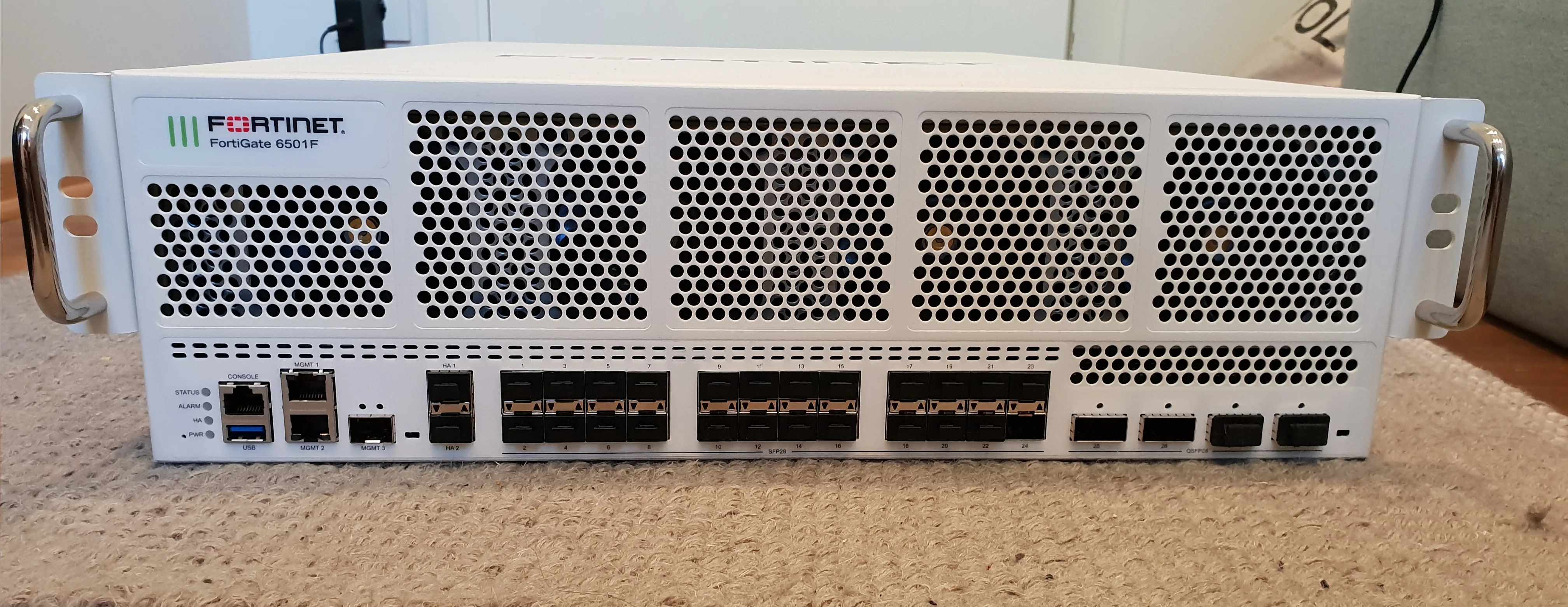
Fortinet is a cybersecurity company that builds hardware and software to protect enterprise networks. In practice, the short answer to “What is Fortinet?” is this: a FortiGate NGFW-centered platform that combines firewalling, VPN, IPS, web filtering, SSL inspection, and centralized management in one architecture. What does it do? It controls internet egress, site-to-site links, remote access, and segmentation; blocks attacks; produces logs; and supports evidence needs for frameworks such as ISO 27001, KVKK, and Turkey’s Law No. 5651 logging obligations.
This guide is written for:
- Network and security teams evaluating firewall platforms
- System administrators deploying and operating FortiGate
- IT managers mapping technical controls for ISO 27001 and KVKK
- Decision makers planning SME-to-enterprise network security investments
Quick Summary
- Fortinet is a cybersecurity vendor founded in 2000 and best known for the FortiGate NGFW family.
- Its core job is policy-based allow/deny, threat inspection, secure VPN access, and centralized visibility.
- FortiGate appliances run FortiOS and combine stateful firewalling with UTM/NGFW profiles in one box.
- Security Fabric connects FortiGate with FortiAnalyzer, FortiSwitch, FortiAP, and related products under one security fabric.
- Correct sizing depends on throughput (Mbps/Gbps), concurrent sessions, VPN capacity, and FortiGuard licensing.
- Common deployments: edge firewall, SSL VPN, IPsec site-to-site, VLAN segmentation, and compliance-oriented logging.
Table of Contents
- What Is Fortinet?
- What Does Fortinet Do?
- FortiGate, FortiOS, and Core Components
- Why Security Fabric Matters
- Who Is It For?
- Common Use Cases
- Selection and Design Checklist Points
- Most Common Mistakes
- Related Articles
- Checklist
- Next Step with Leon-X
- Frequently Asked Questions
- Sources
Image: Wikimedia Commons - Fortinet exhibition stall.
What Is Fortinet?
Fortinet Inc. is a network security company headquartered in Sunnyvale, California. The core of the product family is the FortiGate firewall line, running the FortiOS operating system. Treating Fortinet as “just a firewall brand” is incomplete: the ecosystem also includes wireless (FortiAP), switching (FortiSwitch), logging/analytics (FortiAnalyzer), endpoint (FortiClient), and Zero Trust building blocks.
Short definition:
Fortinet is a cybersecurity platform that provides threat prevention, access control, encrypted tunnels (VPN), and centralized security management at and inside the enterprise network edge.
Technically, FortiGate goes beyond classic packet filtering. It tracks sessions statefully, makes route and policy decisions on the first packet, and can accelerate eligible traffic with hardware offload (NP/ASIC). For packet-flow detail, see How Does a Fortinet Firewall Work?.
What Does Fortinet Do?
Fortinet’s practical value clusters into four outcomes:
- Edge protection: Policies decide which traffic may cross between the internet and the LAN, while UTM/NGFW profiles stop malicious content and attacks.
- Secure remote access: SSL VPN and IPsec connect remote workers and branches through encrypted tunnels.
- Segmentation: Zones and VLANs separate servers, users, guests, and OT/IoT networks.
- Visibility and compliance: Traffic, user, and threat logs feed FortiAnalyzer or SIEM for monitoring and audit evidence.
| Need | Fortinet capability | Typical outcome |
|---|---|---|
| Control internet egress | FortiGate firewall policy + UTM | Allow/deny, URL filter, IPS |
| Connect branches | IPsec site-to-site VPN | Encrypted WAN path |
| Enable remote work | SSL VPN / FortiClient | Authenticated remote access |
| Reduce downtime | FortiGate HA (Active-Passive) | Failover continuity |
| Audit / 5651 logging | Device logs + FortiAnalyzer / SIEM | Retained, reviewable records |
| Central visibility | Security Fabric | Inventory and incidents in one fabric |
FortiGate, FortiOS, and Core Components
FortiGate is Fortinet’s NGFW appliance family, scaling from small-office models (for example 40F/60F class) to datacenter-class platforms. FortiOS provides the shared feature and management surface: policy, NAT, VPN, routing, SD-WAN, and security profiles.
Common security profiles:
- IPS / Antivirus: Signature-based exploit and malware detection
- Web Filter / Application Control: URL and application-level control
- SSL/SSH Inspection: Visibility into encrypted traffic (certificate and privacy trade-offs apply)
- Data Loss Prevention (DLP): Reduces sensitive-data exfiltration risk
FortiGuard service bundles determine how deep “in-the-box” protection stays over time. An unlicensed FortiGate can still route and firewall basically, but enterprise threat prevention depends on current signatures and cloud services.
Why Security Fabric Matters
Fortinet Security Fabric turns FortiGate from a standalone box into part of a broader fabric with switches, APs, analyzers, and endpoints. The goal is to see and respond to threats across the network, not only at one choke point.
Practical results:
- Shared visibility and policy language across devices
- Centralized logging and correlation (FortiAnalyzer)
- A foundation for identity-driven Zero Trust designs
For architecture detail, read What Is Fortinet Security Fabric?. For Zero Trust design, see Zero Trust Network Architecture with Fortinet.
Who Is It For?
Fortinet is a strong fit when you need:
- SME / mid-market: One FortiGate covering firewall + VPN + UTM
- Multi-branch networks: Hub-and-spoke IPsec and SD-WAN patterns
- Compliance-driven organizations: ISO 27001 network controls, KVKK technical measures, 5651 logging
- Managed security consumers: Central policy and reporting discipline
For vendor comparison context, see Fortinet Firewall vs Palo Alto vs Cisco.
Common Use Cases
1. Edge Firewall and Internet Egress
FortiGate manages NAT and outbound policy on the WAN edge. Bad NAT or policy order is a leading cause of “no internet” incidents; use FortiGate No Internet Access Troubleshooting when diagnosing.
2. SSL VPN and Remote Access
Users connect with FortiClient or a web portal over SSL VPN. MFA, split-tunnel decisions, and resource ACL design set the security bar. See FortiGate SSL VPN Installation.
3. Site-to-Site IPsec
Branches or cloud VPCs connect over IPsec. Phase 1/2 parameters, selectors, and routing consistency are critical. See FortiGate Site-to-Site VPN Setup.
4. HA for Continuity
Two FortiGate units in Active-Passive HA keep traffic flowing through hardware failure. See FortiGate HA Installation Guide.
5. Compliance and Network Security Controls
ISO 27001 expectations around firewall, VPN, and access control map closely to FortiGate design work. See ISO 27001 Network Security: Firewall and VPN and FortiGate Access Control for ISO 27001.
Selection and Design Checklist Points
Do not size on price alone. Validate at least:
- Firewall / Threat Protection throughput: Realistic capacity with IPS + AV enabled
- Concurrent sessions and new sessions/sec: Busy office and server traffic
- VPN capacity: Concurrent SSL VPN users and IPsec throughput
- Interface needs: SFP, 10G, HA ports, bypass requirements
- License term and FortiGuard bundles: 1–3–5 year TCO
- Management model: Single-device GUI vs FortiManager / Fabric
Design should start with zones (WAN / LAN / DMZ / Guest), default deny, and admin access (HTTPS/SSH) restricted to a management network.
Most Common Mistakes
- Starting with any–any allow policies that destroy accountability
- Enabling SSL inspection without a rollout plan (app breakage and privacy risk)
- Running a single non-HA edge device (one failure takes down internet and VPN)
- Leaving logs only on the appliance until disk fills (central archive is required for durable compliance)
- Skipping firmware updates before production
- Ignoring license expiry until IPS/web filter quietly degrade
Related Articles
- How Does a Fortinet Firewall Work? FortiGate Packet Flow Guide
- What Is Fortinet Security Fabric?
- Zero Trust Network Architecture with Fortinet
- FortiGate HA (High Availability) Installation Guide
- Fortinet Firewall vs Palo Alto vs Cisco Comparison
- ISO 27001 Network Security: Firewall and VPN
Checklist
- Business need clarified: edge firewall, VPN, segmentation, compliance logging
- User / branch / throughput estimates measured
- FortiGate model sized on threat protection throughput
- FortiGuard license package and term planned
- Zone model and default-deny policy skeleton designed
- HA or spare appliance need evaluated
- Central logging (FortiAnalyzer / SIEM) and retention defined
- Admin access moved to a management network; MFA planned
Next Step with Leon-X
Understanding Fortinet means choosing the right model and operating policy sustainably. Undersizing or open policies hurt both performance and auditability. Leon-X delivers FortiGate design and deployment under Hardware and Software Solutions, especially Router, Switch and Firewall Deployment Service and Network Security, Firewall and IPS/IDS Solutions. For discovery or a proposal, continue through Contact.
Frequently Asked Questions
What is Fortinet in one sentence?
Fortinet is a cybersecurity vendor whose FortiGate NGFW and Security Fabric ecosystem secure enterprise networks with policy control, threat prevention, VPN, and centralized visibility.
What does Fortinet do day to day?
It protects the network edge, connects branches and remote users over VPN, segments traffic with zones/VLANs, inspects applications and URLs, and produces operational and compliance logs.
Are Fortinet and FortiGate the same thing?
No. Fortinet is the company and product ecosystem; FortiGate is the firewall product line. In everyday speech, “we deployed Fortinet” usually means FortiGate.
Is Fortinet overkill for a small office?
Not necessarily. Smaller models can cover firewall + VPN + UTM in one appliance. What matters is correct sizing, licensing, and a simple but strict policy design.
Does Fortinet alone make you ISO 27001 or 5651 compliant?
No. It is a strong technical foundation for access control, VPN, segmentation, and logging, but compliance also needs process, retention, timestamping where required, and monitoring architecture.